Case study
Keys to the Universe
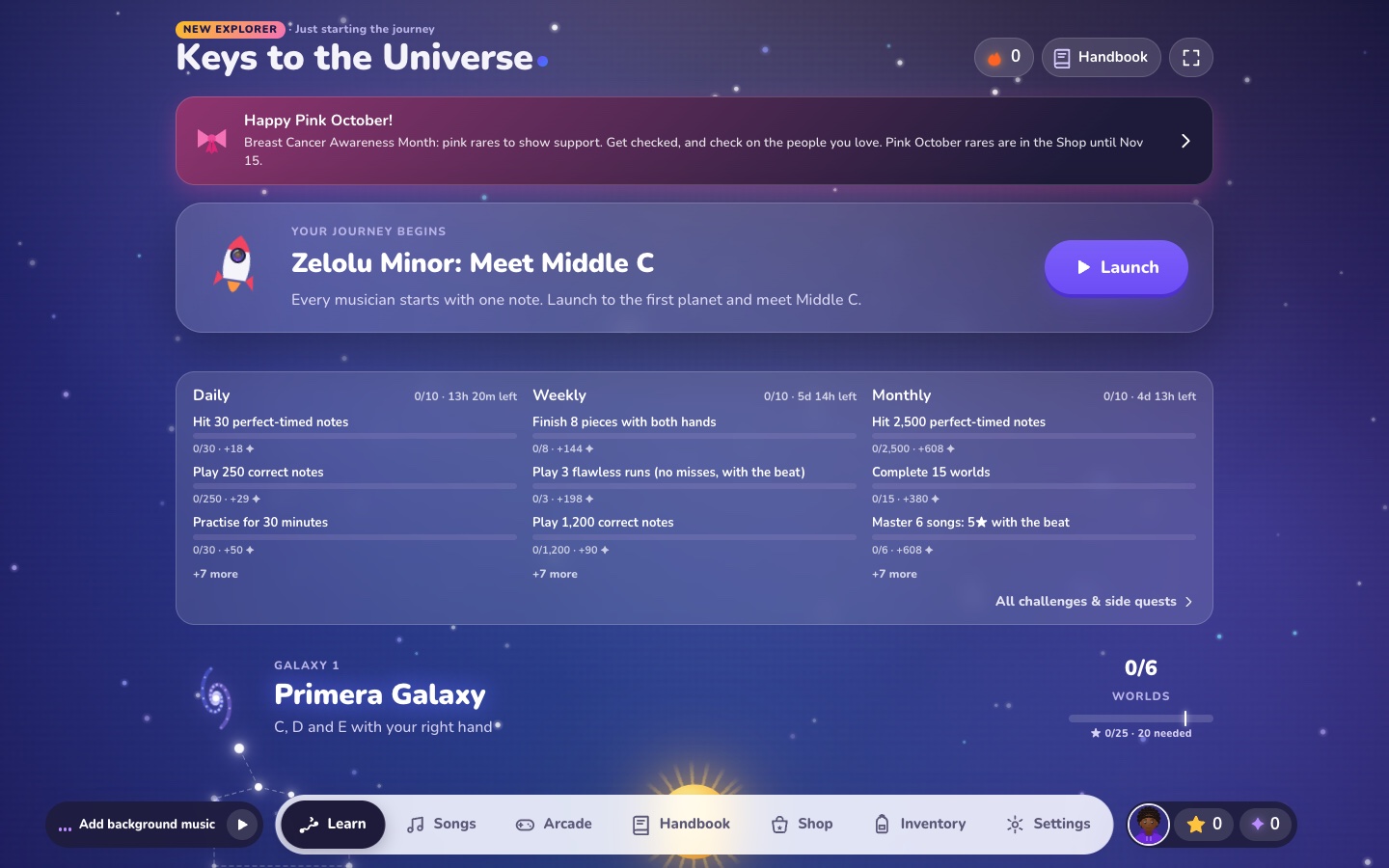
A piano course laid out as a galaxy map, with a player that waits for you — played on a screen, a computer keyboard, a MIDI piano, or a real piano heard through the microphone.
- Role
- Product concept and direction, course structure, and testing as its first learner · implemented with an AI coding agent (Claude)
- Platform
- Browser, installable as a web app · tuned for iPad and desktop
- Interaction
- Own-pace and with-the-beat practice, timing judged Perfect / Good / Early / Late, and menu navigation from the piano keys themselves
- Status
- Live and open source (MIT) · 70 commits over two days, October 2026
- Built with
- JavaScript modules, Web Audio, Web MIDI, a canvas notation renderer, GitHub Pages
Case study
A free piano course built like a game — a galaxy map of lessons, a player that waits for you, and four ways to play — directed by me and implemented with an AI coding agent.
Personal project · October 2026 · Learning design, game UX and product direction · Implemented with Claude as a coding agent · Live on GitHub Pages, MIT-licensed
The problem
I am a beginner at the piano. I had been learning with a paid app, liked how it worked, and wanted a free one I could shape myself — one that starts at the very first note, looks and moves like something worth opening every day, and lets me stay on the piano bench: my piano talks to the iPad, and I did not want to reach for the screen every time a lesson ended.
That made the brief three problems at once. A learning problem: what order does a beginner meet the instrument in, and how does a song get broken down so it can be practised rather than just attempted? An interaction problem: how does an app listen to a real instrument, and how do you move around it with your hands on the keys? And a motivation problem: what makes someone come back tomorrow?
The experience
The course starts at Middle C and goes on through C–D–E, F and G, A–B and the octave, the left hand, hands together, sharps and flats, chords, gospel organ and classics: nine hand-written units, then ten graded galaxies built from 92 public-domain and Creative Commons pieces from the Mutopia Project. In the app each unit is a galaxy and each lesson a world on a path through it — 19 galaxies and 170 lessons, with 127 songs between the built-in melodies and the graded pieces.
A lesson is a short sequence of steps of five kinds: a learn card that shows an idea on an illustrated keyboard before any playing; play steps in the practice player; a song’s practice plan; a Knowledge Check that mixes questions with “play it on your piano”; and, at the end of each galaxy, a Guardian — a boss battle.
Interaction design
Four ways in, one lesson. The same lesson works whatever is in the room: tapping the on-screen keyboard, a computer keyboard mapped across a chromatic octave, a USB or Bluetooth piano over Web MIDI, or an acoustic piano heard through the microphone. A MIDI device wins automatically when one is connected. First launch asks a single question — how will you play? — and the microphone gets its own two-step calibration, first for the instrument’s tuning and then for the phantom notes a particular piano and room produce.
The music waits. Practice runs in two modes. At your own pace, the score holds still until the right note arrives, and the next key is lit on the keyboard with its finger number. With the beat, the music keeps time and each note is judged Perfect, Good, Early or Late. Hit notes turn green on the scrolling staff.
Songs come as a plan, not a wall. A song is broken into its sections, and each section is practised right hand, then left hand, then both, at your own pace; then the whole song at your own pace, then with the beat at 75% tempo, then at full tempo. It turns “learn this song” into a sequence of steps, each one small enough to finish.
Navigating from the keys. The notes around Middle C double as controls — G3 back, A3 up, B3 left, C4 select, D4 right, E4 down, F4 next tab — with an on-screen legend, so a lesson can be finished and the next one started without leaving the bench. Arrow keys, Enter and Escape do the same on a computer.
Feedback that does not nag. Results are out of five stars, with the next step offered straight away: try it with the beat. Showing and counting wrong notes is a setting, and it is off by default, so out of the box a run is scored on the notes you hit.
Gamification
Every reward is earned by playing, and none of it can be bought with money.
- Stars and gates. A galaxy unlocks when the one before it has 80% of its stars. Progress never re-locks something already passed, even when new lessons are added. A Guardian can be fought early to skip a galaxy you already know.
- Guardians. Pass at 75% with the beat, against an energy bar that misses drain.
- Stardust. A currency paid for lessons, Guardians, song steps and daily streaks, spent in a shop of cosmetics — ships, pets, keyboard and sheet themes, key effects, trails, an avatar editor — and on unlocking songs early.
- Something to do today. Rotating daily, weekly and monthly challenges, a streak, 172 badges, ranks, seasonal shop items, and an Arcade with an endless mode, a boss rush, a battle against a rival and four short mini-games for note reading and ear training.
The structure underneath is the one any game designer would recognise — a map, gated progression, a boss at the end of each region, and a loop of daily goals — pointed at a skill instead of at a score.
Iteration
The repository has 70 commits across two days, 18 and 19 October 2026, from the first build — course, sheet-music player, microphone and MIDI input, library and chords — to an account-sync fix. Along the way:
- The microphone went through several rounds: a calibration fix, learning each piano’s phantom notes, and noise rejection for real rooms.
- The Learn screen became the Universe: galaxies of procedural planets on a path, with a starfield behind them. A later change brought back the classic starfield.
- The 100-plus-song journey, Guardians, Stardust, the shop and the challenges arrived together, then the challenges were reworked to rotate.
- The Handbook replaced a separate Chords tab, and the tab bar gained a position setting.
- Knowledge Checks went into every galaxy; stars moved to a five-point scale; the Arcade was rebuilt; every emoji was replaced with drawn icons; the shop was made about four times faster to open.
- It was renamed from Ivory to Keys to the Universe, published as MIT-licensed open source with a public README, privacy policy and terms, and given optional Google sign-in that saves progress to the player’s own Drive and offers to combine both copies when two devices disagree.
Technology
Plain JavaScript modules with no framework and no build step, served from GitHub Pages and installable as a home-screen app that works offline. Audio is Web Audio, with a sampled grand piano and a synthesised fallback while it loads. The scrolling grand staff is a custom canvas renderer; MIDI and MusicXML files are parsed in the app, so a player can import their own sheet music; and the microphone note detector is a custom polyphonic one, built to recognise chords and octaves from a real piano. Progress is saved in the browser, with backup and restore.
My role, and the AI’s
I directed it and designed it; an AI coding agent — Claude — wrote the implementation, and every one of the 70 commits carries that co-author line.
The direction was mine: a course that starts from the very first note and climbs through C–D–E, F–G, A–B, the left hand, sharps and flats and chords; an interface I could drive from the piano keys without touching the screen; a high bar for design polish and motion; free and open source, using only public-domain and Creative Commons music, with anything personal kept out of the public repository; progress that never re-locks once earned, even as lessons are added; and seasonal items released by hand rather than on a timer. The rest of the design came out of working with the agent, and I tested it as its first learner, on an iPad with a Bluetooth piano.
I did not write the code line by line, and this page does not claim I did. What the project shows is design direction carried through to a working product.
What I would change
Phones. It was tuned on an iPad and on desktop. At phone width some of the player screens clip and overlap, and that layout needs its own pass.
Accessibility. The viewport blocks pinch zoom, and the scrolling staff is a canvas with no text alternative for a screen reader. Both should change.
Tests. There are none. Before every release the app is booted in a headless browser to catch a broken start-up, but the note detector and the scoring have no automated tests, and they are exactly the parts that should.
Reflection
Designing a learning experience turned out to be mostly sequencing: what comes before what, and how small a step has to be before a beginner will take it. The game layer only works because that order is right underneath it. It is the same problem as onboarding someone into a headset — the first thing they do has to be something they can succeed at.
Next
Buddy Run
A running coach that guides by rhythm instead of telling you to speed up.
 Case study
 Recollection
A wedding or any milestone, recorded from every direction, so nobody is stuck with one person’s edit of it.
See Reality
Hand-tracked mixed reality for people who have never worn a headset, running inside live guided tours — Boston, Lexington, Nashville, Atlantic Canada, Rome, Pompeii, Venice.
Inhabiting Memory
A VR family museum you enter on foot — real walking inside each room, hand-tracked teleport between them, built from interviews and tested against flat photographs.